
blog · Artikel auf Englisch
What kind of work do my tokens go into?
The usage report in Snotra 1.28 said which model the money went to, not what it paid for. Since 1.29 every chat carries a kind of task, named by the model in the request that already titles the chat, and the report groups by it. A seventh kind, Organisation & admin, follows in 1.30.
Snotra 1.28 brought a usage report. Press Cmd+Shift+K and it adds up what your chats spent over a period, per model and per workspace, by day. That told me which model the money went to. It did not tell me what I had used that model for, and that was the question I actually had.
I want to know which kinds of work make up my token spend. How much goes into coding, how much into writing, how much into looking things up. Only then can I set it against the models I use and ask the useful question: does this kind of work need the expensive model, or have I simply never switched? A total per model can’t answer that. Knowing that one model took most of the money is a fact about the model, not about my work.
So since Snotra 1.29.0, released this morning, every chat has a kind of task, and the report has a third grouping by it.
Seven kinds, and no way to add your own
The list is fixed: Coding, Writing & editing, Research & questions, Data & analysis, Planning & concepts, Organisation & admin and Other. Each one comes with a one-sentence definition, and the same sentence is what the model reads when it decides.
I thought about letting people define their own kinds and decided against it. A report is only useful if this month can be compared with last month, and that stops working the day someone renames a category. A fixed list also means one fixed prompt for the classifier, with no user text inside it, and no settings page. What a chat stores is an id like coding, never a label, so the door for own kinds stays open without anything having to be migrated. I don’t plan to go through it.
Debugging is not a kind of its own. Almost every debugging chat ends in a code change, and two kinds would split the same chats arbitrarily, depending on the moment the model looks at them. The price is that the report cannot single out debugging. I would rather have a classification that comes out the same way twice.
How a chat gets its kind
After the first answer, Snotra already asks the chat’s own model for a title. That request now asks for the kind as a second line. It sends nothing it didn’t send before: the first question and the first answer, each clipped to 1,200 characters, to the provider and model you chose for that chat. The definitions add roughly 150 to 200 input tokens. On a model at $5 per million input tokens that is about a tenth of a cent per chat, and on a local model it is nothing. Because no new content leaves the computer and no new recipient gets any, there is no opt-in.
When that request fails or answers with something that isn’t one of the seven ids, Snotra estimates the kind locally from the tools the chat used. Writes to source files or build and test commands point to Coding, run_python or reading a CSV without writing code to Data & analysis, writes to .md or .docx files to Writing, and only searching and reading to Research. It answers only when one signal clearly dominates, and leaves the chat unclassified otherwise. Planning, Organisation and Other are never estimated, because no tool tells them apart.
The model can be wrong, so the kind sits where you see it: a small pill next to the chat’s title. Click it and the seven kinds open, with the line at the bottom saying where the current one came from.
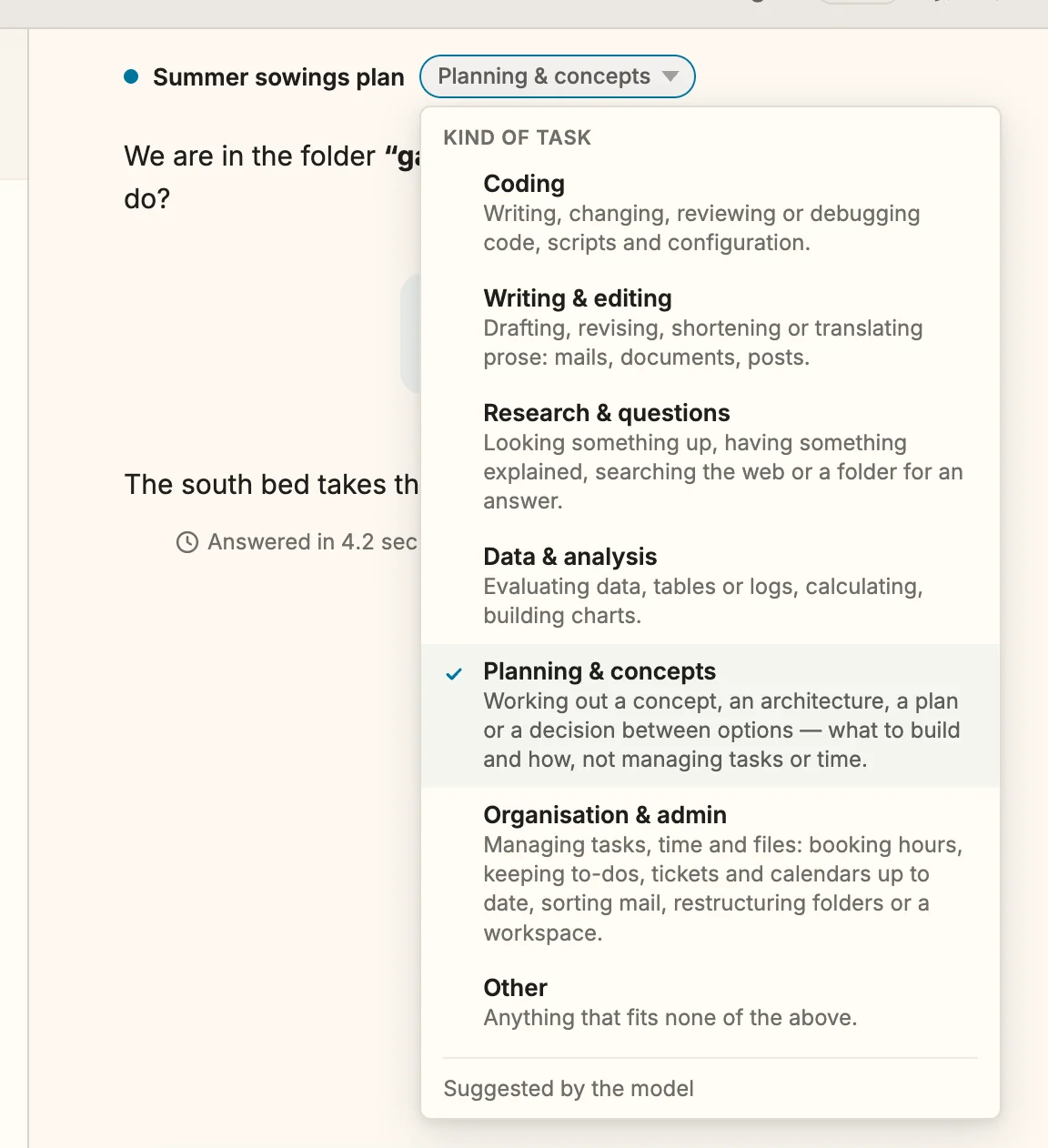
That line reads Suggested by the model, Estimated by Snotra or Set by you. A model answer replaces an estimate, never the other way round. Your own choice is never replaced, not by a later request and not by an estimate.
The report, grouped by what the work was
In the usage report, Task kind now sits next to Model and Workspace. Each row unfolds into the models that were used for that kind, and that is the view the whole feature exists for. It shows, for example, whether lookups that a small model would answer just as well have been running on the large one all month.
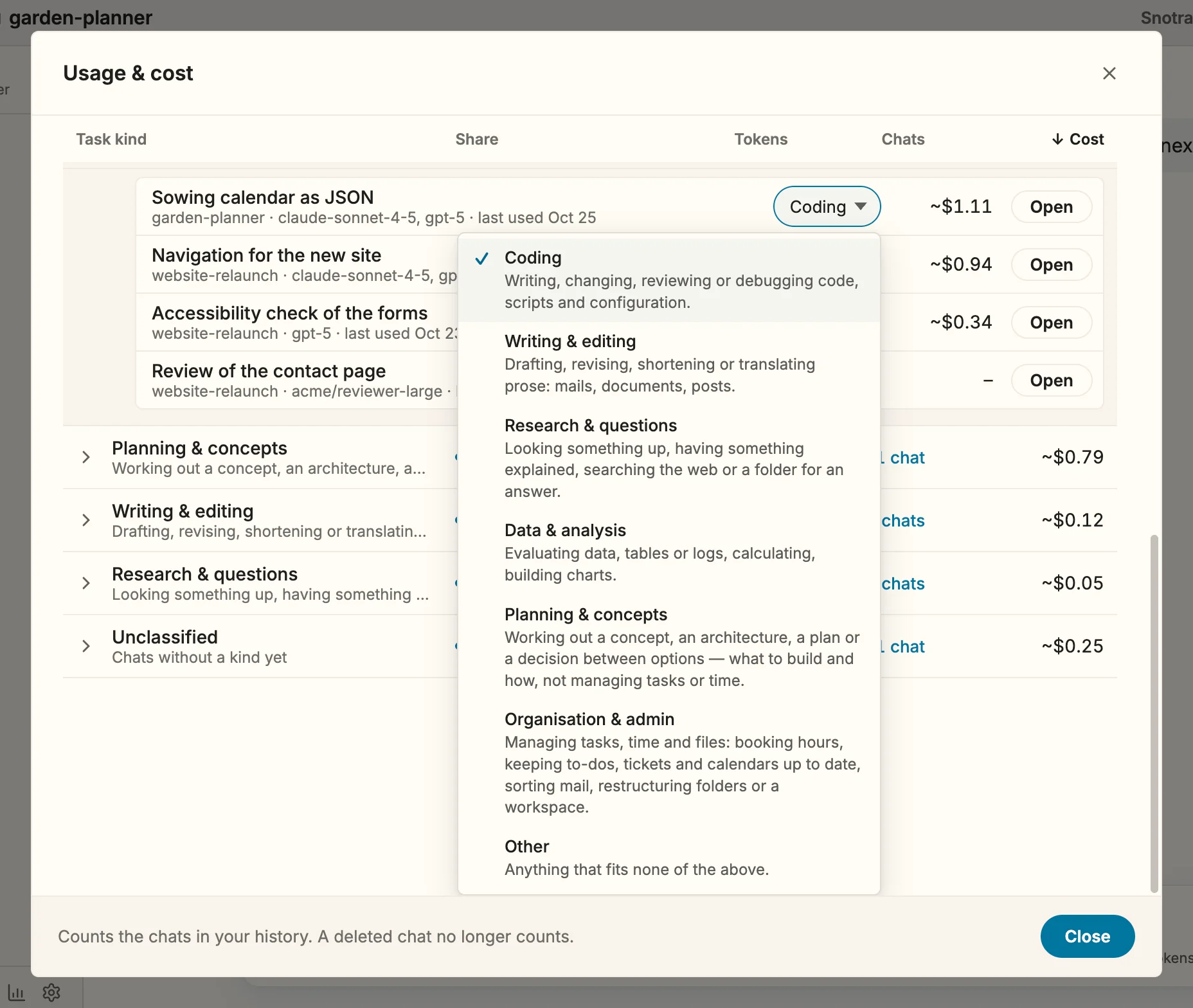
The chats behind a row are listed with their kind, and you can change it right there. The figures follow at once. Chats without a kind are a row of their own, Unclassified, so that grouping by model, by workspace and by kind always arrive at the same total. Nothing is quietly left out.
One kind per chat means all of a chat’s cost counts towards that kind. A chat that starts as a question and turns into a refactoring counts under whatever it got after the first answer. I considered a kind per run and turned it down: every correction would either rewrite the past or not, and both are hard to explain. You can still move a chat that changed course by hand.
Chats from before 1.29 stay unclassified until you continue them or pick a kind. There is no button that classifies the whole history in one go, because that would send old conversations to a model once more. The history keeps the last 200 chats anyway, so the usual periods fill up with classified chats within weeks.
The seventh kind came half an hour later
1.29 shipped with six kinds. Half an hour after the release I opened issue #1312, because organisational work had no home among them. Booking hours, keeping to-dos, tickets and calendars up to date, sorting mail, restructuring a folder: such chats landed in Other, or in Planning as soon as they mentioned a task.
That mattered for exactly the reason the report exists. It put routine work that runs a lot of tool calls but needs little thought into the same row as conceptual work, where a strong model earns its price. Those are the two kinds of chat I most want to see apart, because the first is where a cheaper model is the obvious candidate.
So there is now Organisation & admin, right after Planning, and Planning has a sharper definition that ends in “what to build and how, not managing tasks or time.” Working out what or how is planning. Managing tasks, time or files is organisation. “Plan my week” is organisation. The change is merged and arrives with 1.30. Chats that already have a kind keep it.
What it is and what it isn’t
Every figure is still an estimate from list prices, as described in What did that chat cost?, and your provider’s bill is what counts. The kind doesn’t change how the model answers, which tools it may use or what the chat costs.
It also doesn’t pick a model for you. Snotra could route lookups to a cheaper model by itself, and I don’t want that. The report shows where the money went, per kind and per model. Deciding that research runs on a smaller model from now on is a choice about my own work, and I want to make it knowingly, chat by chat.
Try it
Update to 1.29 and new chats get their kind with their title. The manual pages Check and change a chat’s kind of task and See what you spent across chats have the details. And since the list is fixed, I would like to hear where it doesn’t fit your work, in the Discussions or as an issue: which kind of work do you do with an agent that none of the seven describes?