
blog · Artikel auf Englisch
What did that chat cost? Snotra 1.23 tells you
The question I heard more than any other about Snotra: what does this cost me? Since 1.23 every chat shows an estimate next to the token counter, split by model and kind of token, from a price table that ships with the app and never fetches itself.
If you have ever talked to me about Snotra, chances are you asked it too. It came after demos, in messages and under posts, usually right after “which models does it support?”, and at some point I stopped counting: what does this actually cost me? No other question came back that often.
It is a fair question. Snotra brings no model of its own. You connect the one you want and pay your provider directly, which is the point: no account with me, no markup, no middleman. But it also meant that the app knew exactly how many tokens a chat used and kept quiet about what they cost. You found out at the end of the month, on your provider’s dashboard, summed over everything. Snotra 1.23.0 answers the question where it comes up: in the chat.
A figure next to the token counter
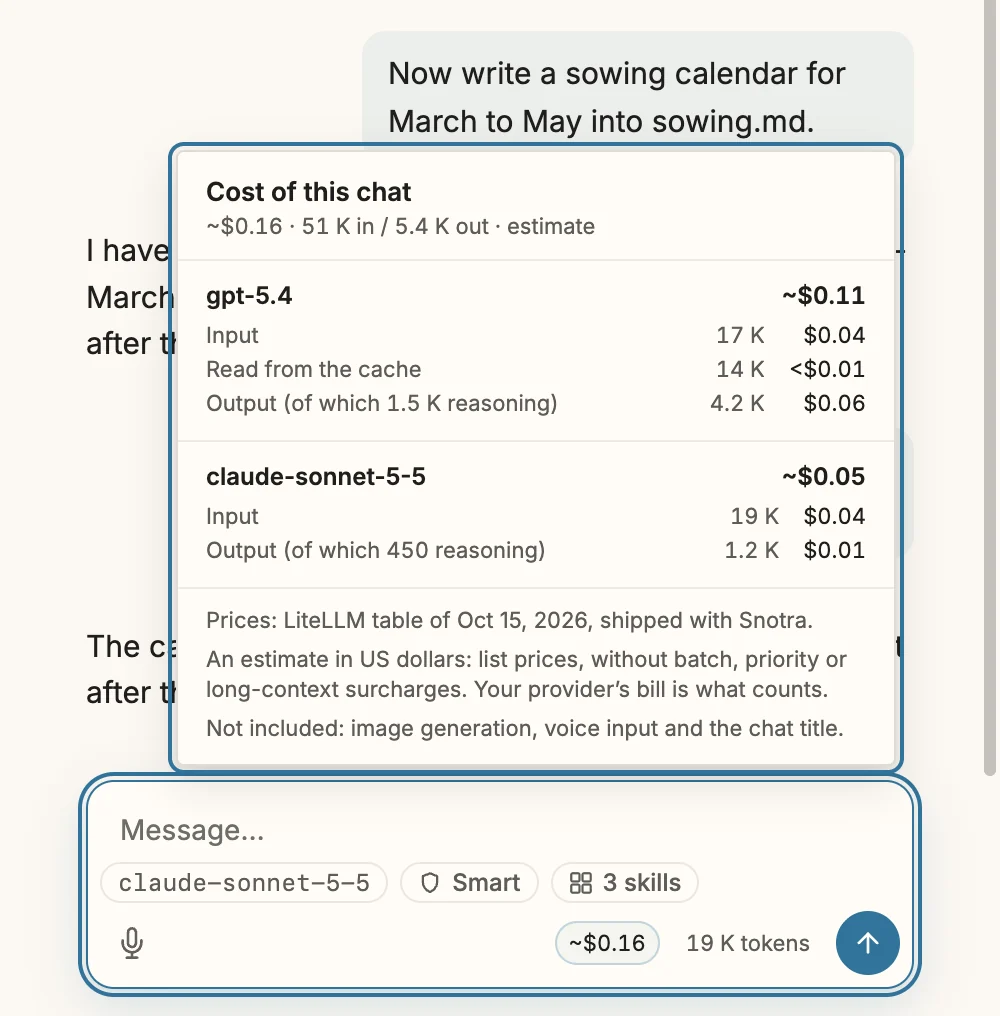
Once a chat has an answer, a small figure appears in the composer bar, left of the token counter: ~$0.16. The tilde is deliberate; more on that below. It covers the whole chat, every request in it, including the rounds in which the agent reads files or runs tools before it answers. That is the part people tend to underestimate: one answer from an agent can be five requests to the model, each of them carrying the conversation so far.
Click the figure and a panel opens with the breakdown.
Not every token costs the same
A token count alone doesn’t tell you much about money, because providers price tokens by what they are. The panel shows the four kinds that matter:
- Input: what the model reads, at the full price.
- Read from the cache: input the provider has seen before and serves from its prompt cache. At the list prices in the screenshot that is a tenth of plain input: 14,000 tokens for less than a cent.
- Written to the cache: some providers, Anthropic among them, charge extra for storing a prompt in the cache in the first place.
- Output, including reasoning. The thinking a model does before it answers is billed as output, whether or not you ever see it. In the screenshot, 1,500 of the 4,200 output tokens are reasoning.
To get this right, Snotra had to stop folding things together. Its usage record used to merge cache writes into the input and ignored reasoning tokens altogether; now both are kept apart for every request. A side effect: Gemini’s thoughts now count as output, as Google bills them.
Switch models, keep the bill straight
Each request is priced with the model that actually served it. Start a chat with one model, switch to another halfway through, and the panel shows two lines, each at its own price, as in the screenshot above. The sum is saved with the chat: open it again tomorrow and the figure is still there. The chat history shows it next to each chat’s time, so a glance down the list tells you which conversations were the expensive ones.
Where the prices come from
Neither OpenAI nor Anthropic offers an API for their prices, and their pricing pages change shape often enough that scraping them would break every few weeks. What the community uses instead is the price table that LiteLLM maintains: unofficial, but broad and kept up to date by many hands.
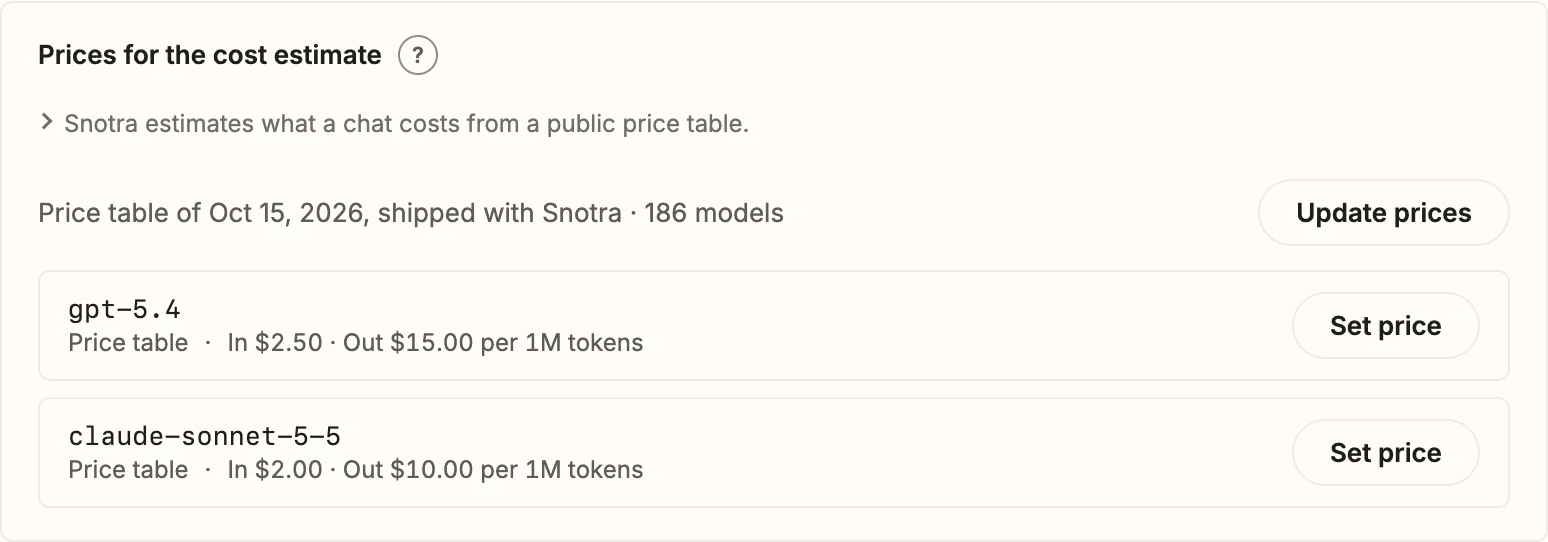
Every Snotra release ships a reduced copy of it, 186 models in 1.23. That works offline, and it gives the same answer on every machine. What Snotra does not do is fetch a newer one by itself. The README promises that nothing phones home, and a price check at start-up would be exactly that: a request you didn’t ask for. So the table only changes when you click Update prices in Settings › Models. The download is checked before it replaces anything, and if it fails, the previous table stays in use and Snotra says so.
Your own price wins
List prices are not always what you pay. You may have a discount, run the model as an Azure deployment, or use a model the table has never heard of. Next to each model there is Set price: input and output in dollars per million tokens, cache prices optional (left empty, they cost what input costs). Your price always wins over the table. Use table price takes it back.
What it doesn’t pretend to know
A cost figure that is confidently wrong is worse than none. So the estimate is careful about the edges:
- A model on your own machine costs nothing. Ollama, LM Studio and any other server at a local address show $0.00, because there is no API bill. If that local server is a proxy that forwards to a paid API, set a price of your own; it beats “local” too.
- An unknown model shows a dash, never zero. If there is no price for a model, its cost reads –. A sum that had to leave requests out ends in a plus: ~$0.42+.
- Some things are not in it: image generation, voice input and the generated chat title. Batch, priority and long-context surcharges and regional prices aren’t modelled either; the list price applies.
That is what the tilde stands for. The figure is an estimate in US dollars, and your provider’s bill is what counts. And it is only a figure: no budget, no limit, no warning that interrupts your work. Snotra tells you what a chat cost; what you make of that stays your call.
Try it
Nothing to set up: update to 1.23 and the figure appears with the next answer. The manual page See what a chat costs has the details, including how to set a price of your own. If your provider bills something the estimate gets wrong, I would like to hear about it in the Discussions or as an issue. And if you were one of the people who kept asking: here it is.