
blog · Artikel auf Englisch
Why I built an open-source AI agent desktop
I wanted to see what actually travels between a language model and the program that drives it. Five months later, that experiment is a desktop agent that works in your folder, asks before it acts and runs on the model you choose.
In spring 2026 I was working with AI agents — Claude Code, ChatGPT, Cursor — and I couldn't have told you in any detail what went back and forth between the model and the program on my machine. I knew the outline: a system prompt, a list of tool definitions, a loop. But agents succeed or fail in the details, and the details were exactly what I couldn't see.
So I started with an experiment: reproduce that exchange with a client of my own and watch every message go by. That experiment is now Snotra AI, an open-source desktop agent. This is why it exists, which decisions shaped it, and what it still can't do.
The experiment: an agent is a loop
Stripped of everything else, an agent harness is a loop. You send the model the conversation and a list of tools it may call. It answers with text, or with a request to call a tool. The harness runs the tool, appends the result and asks again — until the model answers without a tool call, or a round limit ends it.
// Not Snotra's code, just the shape of it.
const messages = [systemPrompt, ...history, userMessage];
for (let round = 0; round < roundLimit; round += 1) {
  const reply = await model.send(messages, toolSchemas);
  messages.push(reply);
  if (reply.toolCalls.length === 0) break; // the model is done

  for (const call of reply.toolCalls) {
    const decision = await policy.decide(call); // run, ask or refuse
    const result = decision.allowed
      ? await tools.run(call)
      : decision.refusal;
    messages.push(toolResult(call.id, result));
  }
}
That fits on a screen, and it misleads the way small sketches do. Every interesting problem lives in one of those lines: what goes into the system prompt, which tools the model sees and how they are described, what a tool result has to look like for the model to use it, how the history is trimmed once it no longer fits — and who decides whether a call runs at all.
Somewhere along the way the experiment became the fun part. Trying a variant, giving the harness one more capability, seeing what a model makes of it: I enjoyed that, and it is largely why the project kept growing. The first commit was in May, v1.0.0 came out in June, and there have been more than thirty releases since.
Why not use an existing tool?
At the start, this wasn't a decision against anything. You don't understand a harness by using one; you understand it by building one. What kept me building once the experiment worked was that the tools I had learned from didn't fit what I wanted to do next.
I wanted any model, and local models above all. Claude Code and ChatGPT concentrate on their vendor's own models; Cursor, the exception, is a code editor. For experimenting, a local model is the most useful one you can have: it costs nothing per token, nothing leaves the machine, and it shows you quickly where your prompts and tools quietly depend on a large model. I wanted a harness where a model on my own machine — through Ollama, LM Studio or an MLX server — sits in the same list as the cloud models, and where switching is a click per conversation, not a different app.
I wanted the folder in view. Most of what I hand an agent is a folder: a repository, but just as often a folder of documents and notes. Chat apps put files behind an upload button. Editors have a file tree because they are editors, and I didn't want an IDE for work that isn't code. I wanted to open a folder, keep it in view and have the chat work inside it.
I wanted it careful by default. An agent that writes files and runs commands on my machine should ask first — as the default, not as a setting I have to go looking for.
And I wanted to be able to read it. If I point an agent at my own files, I want to see the code that decides what it may do there. Open source, no account, no server in between, no telemetry.
Today, open source, any model, MCP and skills are what most agent desktops offer. That has become the entry ticket to the category, and there are good tools in it; the README compares Snotra with Goose, Jan, LM Studio, Cherry Studio and others, as of September 2026. What is left as a difference is the part I cared about from the start: how the agent works in your folder, and how carefully it acts there.
The decisions that shaped it
The folder is the workspace
You open one folder. The file tree stays in view, the chat sits beside it, and files the agent writes appear in the tree while it writes them. The file tools stay inside that folder in every mode; the only thing they may read beyond it is the skills you enabled. That boundary is easy to state and easy to check, and it keeps every approval readable: a path on the card is a path you can see in the tree. Commands are a different matter — more on that below.
It asks before it acts
Every tool has a risk class — read, read-sensitive, write, delete, execute, external — and every call passes a policy in Electron's main process that weighs the class against the chat's mode. In the default mode, Smart, reading runs; changing a file, opening something that looks like a secret (.env, keys, credentials), running code or calling an outside service asks first. The approval card shows the tool, every target path and a preview of the change or the complete command. Esc denies, no button is preselected, and the card waits as long as you do.
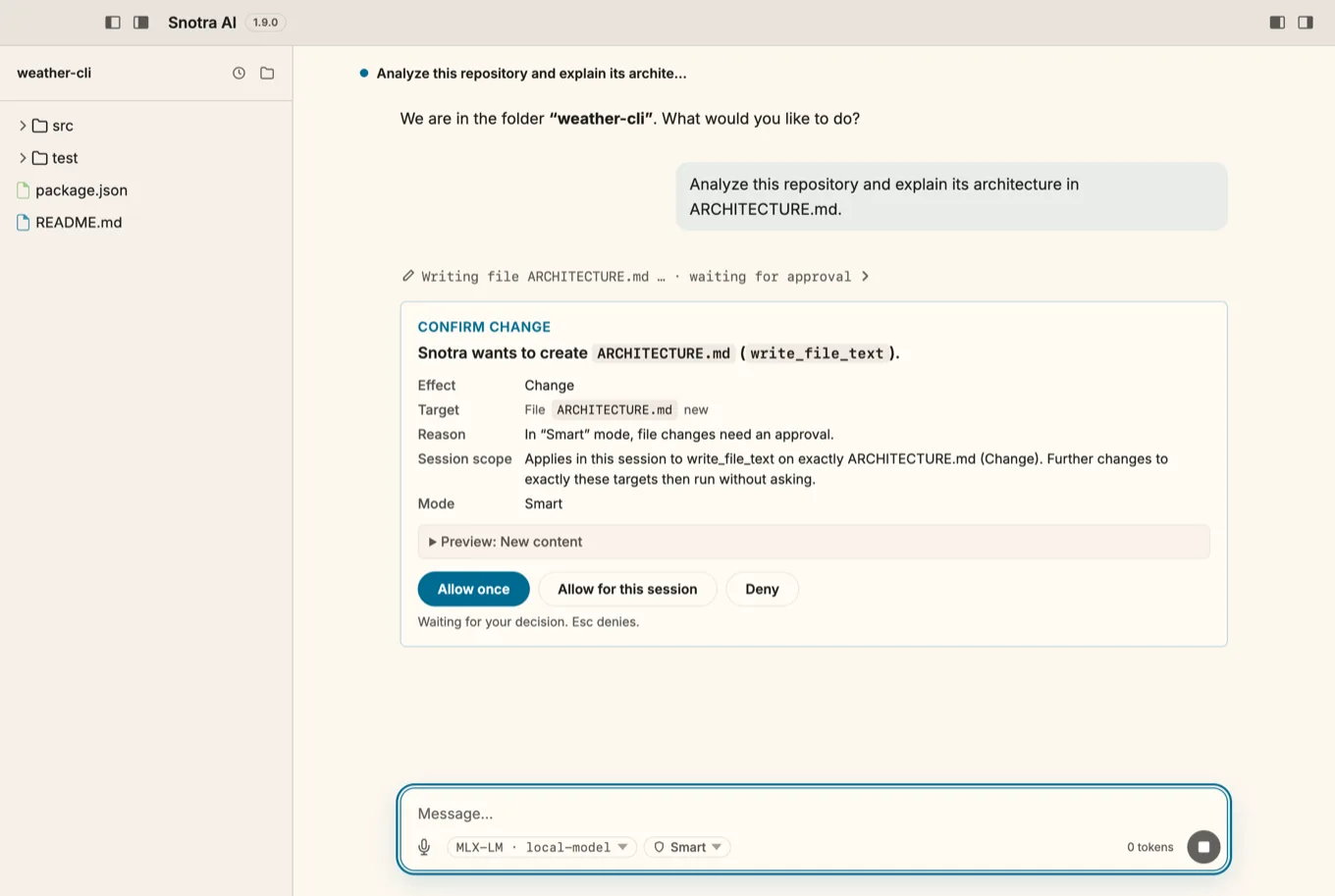
ARCHITECTURE.md and waits for a decision.Running commands is off until you switch it on. After that, every shell command and every Python script gets a card of its own, and there is deliberately no “allow for this session” for them. What you can do is remember one exact, simple command line for a folder: git status then runs without asking, while git status --short, a pipe or a variable still asks.
Auto exists, and it drops the questions. But it is a decision you make, not the default: switching to it takes a confirmation in a system dialog, a new chat starts in Smart, and Auto doesn't survive a restart. The hard boundaries stay in every mode.
The rule I care about most is the least visible one: nothing the model reads can grant a permission — not a file, not a web page it fetched, not a skill. The model reads text from all of those, and some of it will be written to steer it. If text could loosen the rules, the rules would be decoration. So the policy runs in the main process, and your decisions are kept outside the workspace in a signed file of their own, where a repository you just cloned cannot relax them for itself.
Commands run in a sandbox — on macOS and Linux
An approval card is only as good as the person reading it, and a command can do more than it says. Since v1.9.0, shell commands and Python scripts on macOS and Linux also run in a sandbox, built on Anthropic's sandbox runtime (@anthropic-ai/sandbox-runtime). A run can write only inside the project folder and a temporary folder, cannot read keys, cloud credentials or browser data, and reaches the network only for the domains the approval card lists. It is on by default; you can switch it off for one folder when it gets in the way, never for all of them.
Two things I learned there. First, availability has to be tested, not assumed: on Ubuntu 24.04 the runtime's own dependency check passes, and then every command fails, because the system restricts unprivileged user namespaces. So Snotra runs a self-test through the real sandbox — one write that must succeed, one that must be refused — and shows the result on every card. Second, the scope has to be said out loud. The sandbox does not stop a command from reading your other files. And on Windows there is no sandbox yet: a run there has your full rights, and the card says “Not isolated” in amber.
Cloud and local models on equal terms
Snotra has five providers: OpenAI, Anthropic, Google, Ollama — and OpenAI-compatible, for everything else with an OpenAI-shaped API: LM Studio, MLX-LM, llama.cpp, vLLM, OpenRouter, a company gateway. Each entry of that last one carries its own address and key, so a local LM Studio and a remote gateway sit side by side. MLX-LM used to be a provider of its own; in v1.10.0 it became a template of the generic one. One well-tested path for every OpenAI-shaped server turned out to be worth more than a special case per server.
The model belongs to the conversation, so switching doesn't mean starting over. Whether a model counts as local is decided by the host of its address, not by the provider: localhost, 127.0.0.x, ::1 and *.local get a more generous timeout for listing models and a tighter budget for the history. A list of provider names couldn't answer that question, because the same provider serves LM Studio on localhost and a gateway across the network.
There are no provider SDKs in between. Each provider speaks HTTP directly and streams its answer — which is what the experiment was about in the first place: I wanted to see the wire, not a wrapper around it. The whole app has five runtime dependencies: a Markdown parser, an HTML sanitizer, an HTTP client, a font and the sandbox runtime.
Skills are text, MCP is configuration
A skill is a folder with a SKILL.md in the Agent Skills format: a name, a description and instructions in Markdown. A skill in the workspace, under .agents/skills/, travels with the project; one in ~/.snotra/skills/ is there for every folder. Expertise isn't programmed, it's described — anyone who can write a good checklist can write a skill.
MCP servers bring in tools from other systems — an issue tracker, a database, an internal API — by configuration rather than by release. Both have become standard in the category. What mattered to me is that neither needs code of mine to extend what the agent can do.
A core that doesn't know it runs in Electron
Snotra is an Electron app with a plain JavaScript interface and no framework. Underneath, the chat orchestration — the loop above, the tool rounds, the history trimming — lives in a core that knows neither Electron nor the providers nor the file system. It only sees ports, and the main process plugs adapters into them. A test fails as soon as the core imports anything outside its own layer and the shared modules.
The reason is the other half of the motivation. I wanted Snotra to be something developers can use to try agentic work for themselves — and to build agents for specific use cases on top of the same harness, for a team at work or for something entirely private. The core is cut so that it could run behind a different front end. None exists yet; what can be made of it, I'd like to leave to people with better ideas than mine.
What is still missing
Quite a lot, and I'd rather you read it here than find out yourself:
- Signed builds. macOS and Windows warn on first launch; the README walks you through it (#19).
- A sandbox on Windows. Commands there run with your full rights — visibly, but still.
- MCP over HTTP. Only servers started locally over stdio work today (#341).
- Seeing what the agent changed. You watch files appear and you approve a preview, but there is no diff view afterwards yet (#348).
- Images beyond OpenAI. Image attachments go to OpenAI and, if you switch it on, to OpenAI-compatible servers; Anthropic, Gemini and Ollama are still open (#90, #91, #92).
- Other people. So far this is one person's project. CONTRIBUTING.md describes the way in.
Where it stands
Snotra is a personal open-source project under the Apache 2.0 license: no company behind it, no paid tier, no account, no telemetry — not even opt-in. It runs on macOS (Apple Silicon), Windows and Linux. The name comes from Norse mythology, where Snotra is the goddess of wisdom and prudence — which is roughly what I want from an agent in my folder.
If you try it, two things would help me most. If you run local models: which server, which model, and where did the agent fall over? And if you have built a harness yourself: how did you decide what the model may do without asking? The Discussions are open for both.