
blog · Artikel auf Englisch
How much context does each tool take?
Every tool that is switched on sends its description with every request, whether the chat uses it or not. Snotra’s own tools come to about 10,600 tokens, one Atlassian MCP server to 21,880. Since 1.27.2 the settings show the estimate next to each switch.
On September 18 I measured what the Atlassian MCP server costs when it is connected to Snotra. It brings 73 tools. With all of them switched on, their descriptions came to 21,880 tokens by Snotra’s estimate, before a single word of the conversation. All 22 tools of Snotra’s own that can be switched on come to about 10,600.
Those tokens are not paid once. A model only knows a tool if the request describes it, so every tool that is on sends its name, its description and its parameters with every request, whether the chat ever calls it or not. An agent’s answer is often several requests, one for each round in which it reads a file or runs a command, and every round carries the whole set again.
With a cloud model you pay for that on every round. With a local model it takes room: in a context window of 32K tokens, the Atlassian server alone fills two thirds.
Where Snotra shows it
Snotra knew the figure before, but only after the fact. The context breakdown in the chat estimated the tool descriptions once a request had gone out, with the built-in tools as one sum and each MCP server as another. That told you the tools were expensive. It did not tell you which one to switch off.
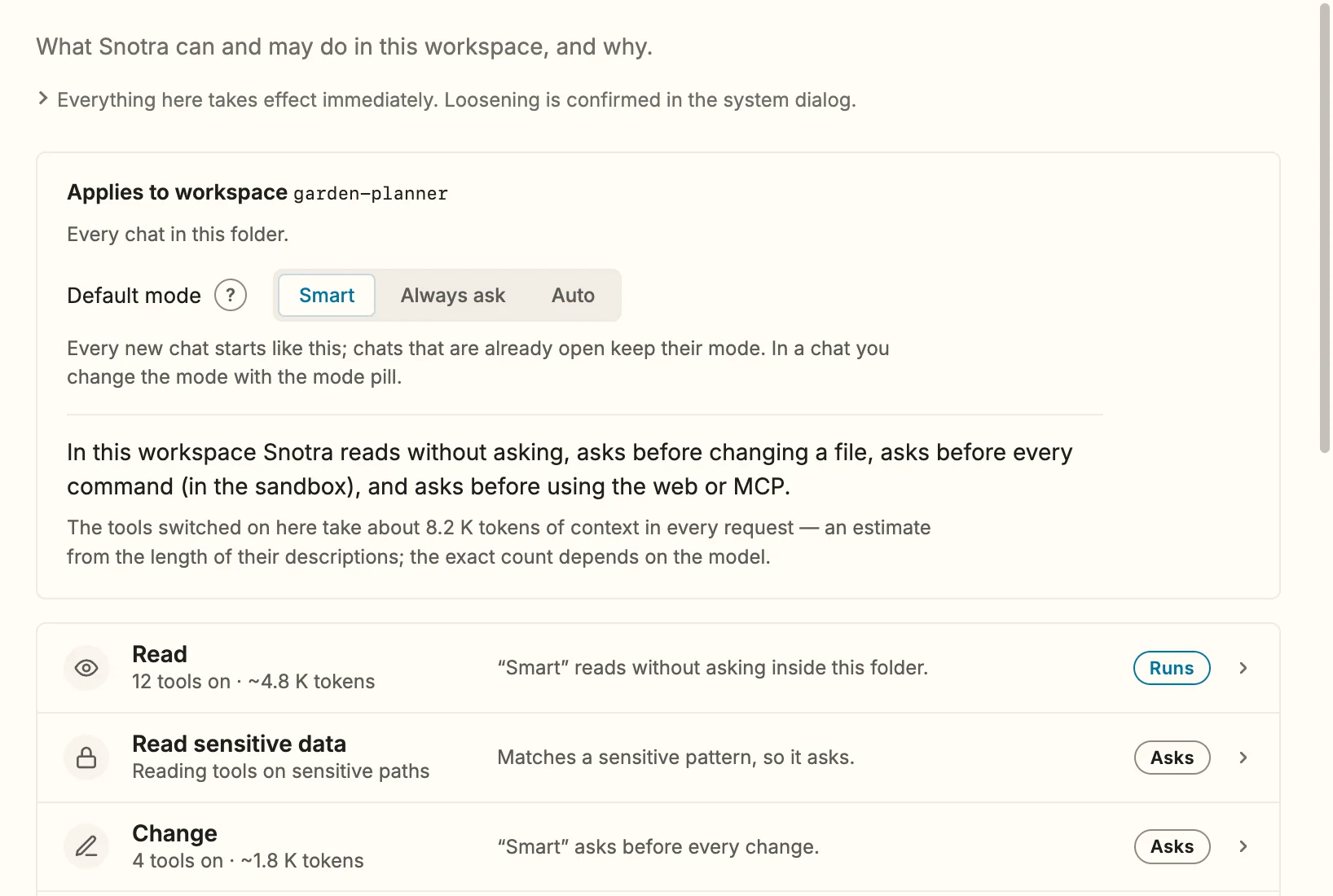
Snotra 1.27.2 puts the figure where you decide. Settings › Tools › Autonomy opens with a line saying about how many tokens the tools switched on there take in every request. Each row adds the sum of its tools to its count, and inside a row every tool shows its own figure next to its switch. A tool that is off keeps its figure, because that is what switching it on would add. An MCP server shows its total in the connection state, as in connected · 2 tools · ~221 tokens, and a tool Snotra only knows by name reads tokens unknown until its server has connected.
What the built-in tools cost
I ran the same estimate over the tool descriptions of 1.27.4. There are two columns because Snotra uses two divisors, one measured against Qwen for local models and one against o200k_base, the tokenizer of OpenAI’s current models.
| Tool | Local model | OpenAI |
|---|---|---|
shell_execute | ~1,318 | ~739 |
run_python | ~833 | ~468 |
list_release_notes | ~653 | ~367 |
remember | ~650 | ~365 |
apply_patch | ~604 | ~339 |
search_in_files | ~600 | ~337 |
generate_image | ~595 | ~334 |
fetch_url | ~323 | ~181 |
edit_file | ~310 | ~174 |
read_file_text | ~177 | ~100 |
| All 22 in the settings | ~10,654 | ~5,978 |
Two more, list_directory and load_skill, go out with every request and are not in the settings, because without them the model guesses paths and skills. They add about 420 tokens.
The JSON of a tool description is dense. Qwen’s tokenizer makes a token out of every 2.3 characters of it, OpenAI’s out of every 4.1, so the same tool costs a local model almost twice as much. For Anthropic and Google I have no tokenizer to measure against, and their models get the local divisor, the more cautious of the two. I would rather overstate the tool block than send someone cleaning up in the wrong place.
shell_execute is the most expensive single tool. Its description says which shell runs on which system, where the command runs and how to name the hosts a sandboxed run may reach. I could cut that down and save a few hundred tokens per request, and pay for it in commands the model gets wrong.
An estimate on purpose
The figures come from the length of each description, not from a tokenizer. An exact count would need each provider’s tokenizer in the app or a request to its API, it would not work offline, and it would differ from model to model. To decide which tool to switch off, the estimate is enough. It is also the calculation the chat’s context breakdown uses, so the settings and the chat never disagree about the same tool.
Why not load tools only when they are needed
The obvious answer to a big tool block is a one-line catalogue in the prompt and the full description on demand. Snotra already does that with skills. For the built-in tools I did the arithmetic and dropped it. The loading step produces a tool result of its own, and that result travels in the history of every later round. A small MCP server with four tools, one of them loaded, came out 19 percent more expensive over four rounds than simply sending everything.
The point where it turns is about 14 active MCP tools. Above it, loading on demand pays off; below it, doing nothing is cheaper. That change is merged (kkrafft1999/snotra#1246) and comes with the next release.
Until then the switch does the job. With ten of its tools switched on instead of all 73, the Atlassian server costs 4,224 tokens instead of 21,880.
The figures are on Settings › Tools › Autonomy from 1.27.2 on, and the manual page Tools and security explains how they are made. If you run MCP servers, I would like to hear in the Discussions which one takes the most context in your setup.