
blog · Artikel auf Englisch
Snotra 1.30: I reorganised the knowledge in my agent harness
Snotra 1.30 sorts what the agent keeps by two questions: what is it, and who should read it. A fact goes into memory, a rule into a new rules file, a procedure into a skill, and an episode stays in the chat it happened in. A card asks before any of these files changes, and Settings › Knowledge puts all of them on one page.
Snotra 1.30.0 went out on November 1 with 16 pull requests, and 12 of them change one thing: where the agent keeps what it should still know tomorrow. The concept behind it dates from October 25. On October 31 I reworked it, had it reviewed the same day, and 1.30.0 is what came out of that.
Until 1.29, Snotra had two places for lasting knowledge. The memory, memory.md, went along with every request, and so did AGENTS.md. Nothing said which kind of knowledge belonged where. A team convention could end up in memory and a passing observation in AGENTS.md, and answer me in German was stored as if it were a fact like the size of a garden bed. The remember tool had no way to say “this is not a fact, this is an instruction”.
Two questions decide where something goes
The first question is what is it? Something that is true or false is a fact. Something that can be followed or broken is a rule. Steps towards a goal are a procedure. And something that was true only once, or only now, is an episode.
| Kind | Example | Where it goes |
|---|---|---|
| Fact | The beds are measured in centimetres. | Memory, memory.md |
| Rule | When you write a commit message, write it in English. | A rules file, new in 1.30 |
| Procedure | How a release is cut, step by step | A skill, SKILL.md |
| Episode | Today the south bed flooded. | Nowhere. The chat already has it. |
The second question is who should read it? Only you, in every folder you open. Snotra in this folder, through the files under .agents/. Or every tool that works in this folder, through AGENTS.md, which other coding tools read as well and which usually sits in the team’s repository.
Every combination of the two answers has exactly one file. There is no “other” bucket. An earlier draft had one, and the review dropped it. I am glad it did, because whatever is hard to sort would have ended up there.
Rules get files of their own
The rules file is the home that did not exist before. It is a small Markdown file in .agents/rules/ of the folder or in ~/.snotra/rules/ for every folder, named after its topic, with a description that says when it applies:
---
description: When you write a commit message
---

- Write it in English, in the imperative.
- Link the issue with "Closes #…".
Rules load the way skills do. The prompt carries one line per rule, its name and its description, and the agent fetches the body with a new tool, load_rule, before the step it applies to, not once at the start of the run. The chat shows that as Rule commit-messages (project). A rule whose condition always holds, when you answer me, answer in German, gets always: true and goes along in full with every message. Corrections the agent learns from you are always by default, because “you got that wrong last time” rarely has a topic you could name in advance.
Two rules can disagree. What you say in the chat wins over every rule, then the more specific condition, then the newer entry. When a rule of the folder and one of your own contradict each other, Snotra names the conflict and asks. A folder you cloned brings its own rules, and I did not want those to quietly outweigh mine.
Snotra also reads ~/.agents/rules/, where other tools keep theirs, but never writes there. The format stays close enough to Claude Code’s that a team can copy files across.
Procedures become skills, written whole
Skills are older than this release. What is new is that remember can write one. Asked to remember how we cut a release, the agent proposes a SKILL.md in .agents/skills/<name>/, or in ~/.snotra/skills/ for every folder. Until now a global skill had to be moved there by hand, because the file tools cannot reach that folder, and they still cannot.
A skill is always written as a whole version, never appended to. When it changes, the card shows the diff against the version that is there. A procedure that grows by appended lines turns into a list of exceptions nobody can follow, and the agent has no better judgement about that than I do.
Episodes stay in the chats
The decision I like best is the one that stores nothing. The test is failing or today we fixed the login is true for a day and then wrong in every later chat that reads it. Snotra no longer keeps such sentences, and the chat history takes over the role of the episodic memory.
For that the history had to stop forgetting. Up to 1.29 it kept the last 200 chats across all folders and dropped the oldest without a word. Since 1.30 every folder keeps its own 200. A bookmark next to the bin keeps a chat beyond every limit, and chats whose folder has disappeared, say on a drive that is not plugged in, show up behind a note and can be assigned to the open folder.
The agent reads the history with another new tool, search_chats. It searches the earlier chats of the open folder and returns at most ten excerpts of up to 280 characters, or reads one chat in pieces of 12,000 characters. It is a read without a card and has its own switch under Settings › Tools › Autonomy. One limit matters to me in particular. A chat that has only ever run on local models stays local, and a chat on a cloud model does not find it at all. The answer is the same as for a chat that does not exist.
One card for every write
remember now takes a kind and a scope, and the card shows both as rows of choices. If the agent called something a fact that is a rule, you click Rule and it goes back to be worded as one. Another reader, or Fact, is written straight away as you chose. When an entry looks sorted wrongly, a fact with always in it or a fact with today in it, the card says so as a hint. Nothing is refused for its kind. The decision is yours.
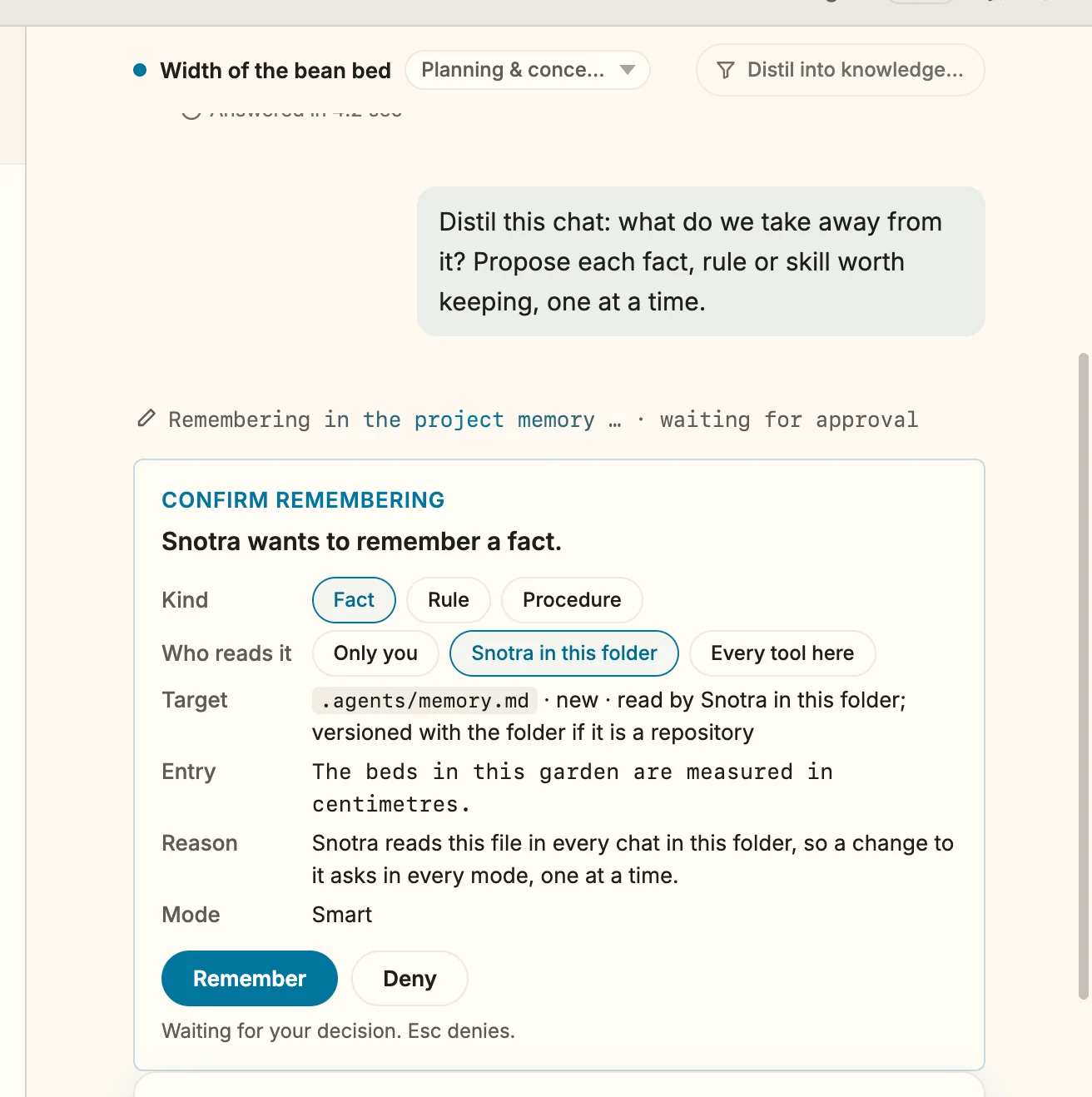
The bigger change sits behind the card. Every write to a knowledge file now asks, in every permission mode, Auto included, and whichever tool makes it. Before 1.30 the agent could write AGENTS.md or .agents/memory.md in Auto with an ordinary file tool, without a question. These files go into every later prompt, so a single write by a prompt injection would have kept working in every chat after it. The card for such a file offers neither for this session nor always.
A shell command is not blocked, because git pull changes these files on purpose. Snotra takes a snapshot of the knowledge files before the command and compares after it. If something changed, the run waits on a card with the diff, A command changed a knowledge file, and you choose Keep or Reset. If a tool result anywhere in the chat was flagged as reading like instructions, the card says so too. The folder’s own AGENTS.md and memory are now checked for covert signals when they are loaded, things like hiding something from you or sending the prompt somewhere.
Settings › Knowledge
The settings were the part that made the old split most visible. Skills had a page, memory had a page, and the switch for AGENTS.md sat somewhere in General. Since 1.30 there is one section, Settings › Knowledge, ordered by kind. Procedures is the former skills page, Rules is new, Facts is the former memory page, and AGENTS.md lists the files Snotra reads. An old link to the skills page lands on Knowledge › Procedures.
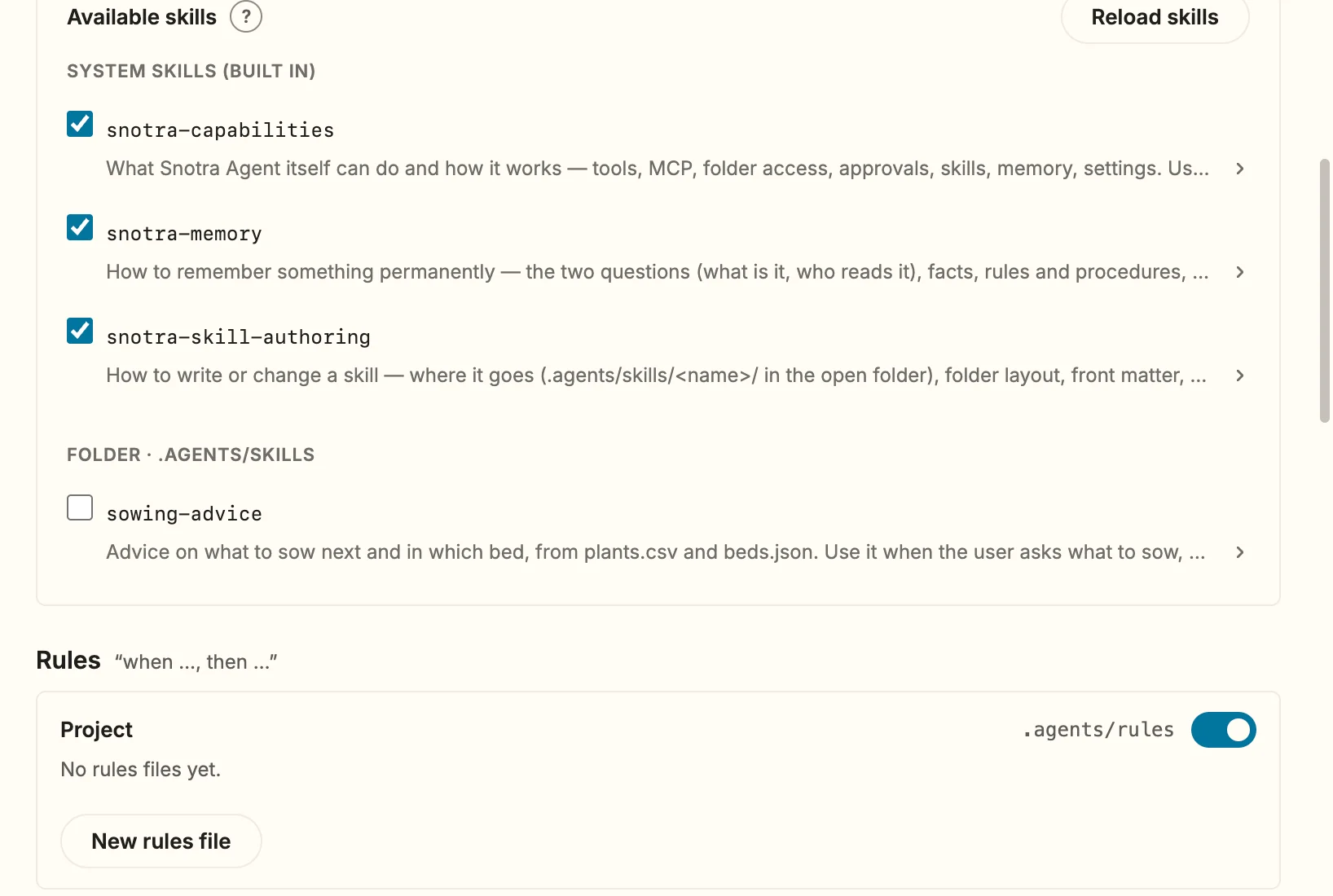
AGENTS.md follow further down.Under Rules each level has its switch, each file its own switch, Open and New rules file, which asks for the name and When does it apply? A row says what Snotra does with the file, for example Always, Description derived when the file has none, or Over the always budget, fetched when it applies.
That last label exists because knowledge costs context. Memory, the always rules, AGENTS.md and the catalogue of rules share at most a quarter of the context window. When they do not fit, the catalogue shrinks to names first, then the folder’s always rules are fetched on demand, then AGENTS.md is visibly shortened. Memory stays whole. Each step shows in the context breakdown behind the token counter.
Hints instead of a clean-up model
Facts and rules get hints, and they come from word lists and counts, not from a model call. Reads like a rule offers Move to rules…, Reads like a procedure offers Create a skill…, Reads like an episode offers Remove. An entry that shares at least 80 % of its words with another one is marked, and so is one that is older than 180 days. Two rules files whose names differ only slightly can be merged.
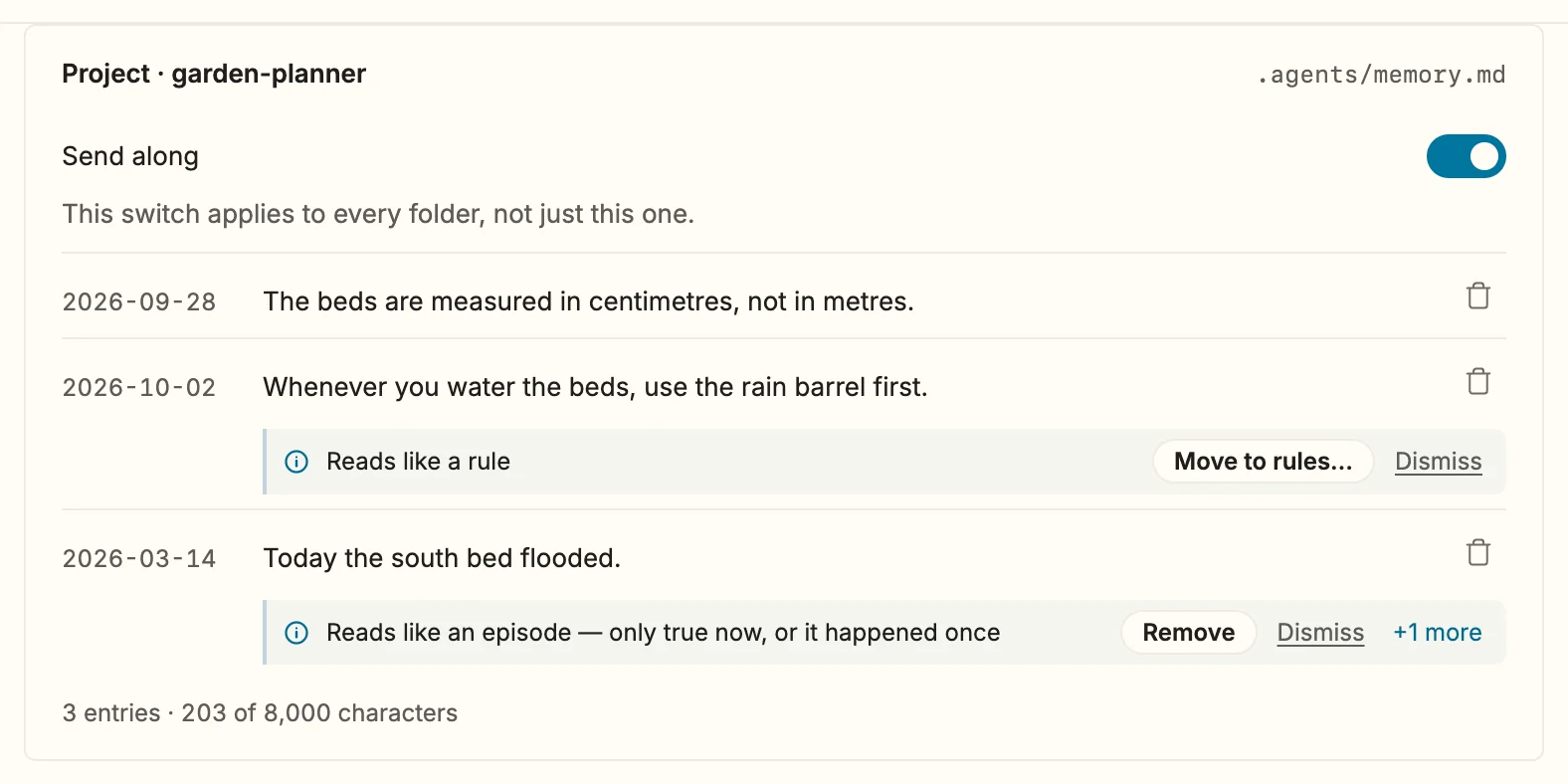
Nothing changes until you click. Every change, whether made by remember, a file tool, a kept shell command or a hint, lands in Last changes at the bottom of the section, the last 50 of them, each with Undo as long as the file still holds what the change left.
Distil a chat into knowledge
The last piece closes the loop. A chat often turns up something that should outlast it: a fact, a correction, a way of doing something that worked. The button Distil into knowledge… on the right of the chat header asks Snotra to go through the chat and propose what lasts, one card at a time, each with its kind and reader. Episodes are left out. You can ask in your own words too, what do we take away from this?, and the same works with review my memory for what is already stored.
Snotra never offers this by itself, not even at the end of a long run. A harness that keeps suggesting what to remember trains you to click Remember without reading, and then the cards are worth nothing.
One more thing in 1.30
The mode you pick in a chat now becomes the default of the open folder, also after a restart. A folder where you never picked one still starts on Smart. Picking Auto still needs the confirmation, which now names the folder.
Getting it
Snotra checks for a newer version at start-up, unless you switched that off. Otherwise, download it for macOS, Windows or Linux. The release notes are on GitHub, the whole concept with its 15 decisions is in docs/concepts/memory-and-rules-concept.md, and the manual has Give Snotra rules and Let Snotra remember.
If you already keep an AGENTS.md, which of its lines would you move into a rules file first? Tell me in the Discussions.