
blog · Artikel auf Englisch
Snotra 1.13.2: time to pay down technical debt
Agentic coding changed how fast software gets written, not whether technical debt piles up. 1.13.2 is the first installment of a code review in eighteen blocks: thirty findings in the core of the app, all fixed. Plus a sandbox whose state you can see at a glance.
Snotra 1.13.2 is out, and it has hardly anything new to show. That is on purpose. After a run of feature releases — skills that write back, Settings › Security, the MCP status — this one goes into the parts of the app you don't see: the permission checks, the sandbox, the chat engine, the provider adapters. It is the first installment of paying down technical debt, and it won't be the last.
Debt still piles up
Snotra is largely written with a coding agent. That has changed a lot about how the work goes: a feature that would have taken me a week is often done in an afternoon, tests included. It has not changed that debt piles up.
An agent does what the task in front of it needs, and it usually does that well. What it doesn't do by itself is step back and ask whether the module it has just extended still has the right shape, or whether a check written in July still covers what was added in September. Every change is green on its own. The debt sits between the changes — and with more changes per week, it piles up faster, not slower.
The findings below are full of examples. The shell runner and the Python runner each had their own copy of the code that starts, limits and stops a process, and the two had started to drift apart. The file that wires the app together had grown to almost a thousand lines, because it was always the quickest place to put one more thing. The check that keeps your own API keys out of tool results knew about the provider keys, but not about the web search key, which came later. None of this was anyone's mistake in the moment. It is what a code base looks like when nobody has taken the time to look at it as a whole.
So I took that time.
A review in eighteen blocks
Snotra has about 68,000 lines in src/ and more than 200 test files. Reviewing all of it in one go would produce one huge list of findings and one huge change to fix them — the opposite of what you want in an app that decides what an AI agent may do on your computer.
The review concept cuts the code base into eighteen blocks along its existing architecture, each between 2,000 and 4,500 lines of production code, reviewed together with its tests. The blocks come in five waves: the stable and security-relevant parts first, the areas that are still changing — the file tree, the file preview, the MCP transport — last. Some rules keep it honest:
- The project's own documents are the standard. The architecture, the security concept, the code conventions and the UI rules. OWASP and the Electron security checklist serve as a checklist, not as the yardstick.
- “Could be nicer” is not a finding. Bugs, security gaps, possible data loss and breaks with the documents always count. Maintainability only counts with a cost you can name — a duplicate that has already drifted, a core module nobody can follow any more.
- One issue per finding, at most eight per block. Smaller things go into one bundle per block, so each block can be read at a glance. Every issue states its severity, its effort and when it counts as done.
- The founding decisions are not up for debate here. Plain JavaScript, no framework in the renderer, the layering itself — they get an architecture review of their own once this one is through.
Finding and fixing are kept apart. A block is done when its findings are filed, not when they are fixed. The progress is public in the review epic.
What the first five blocks found
The first wave covers the foundation and the trust boundaries, the second the core of the chat: the app's skeleton, the permission decisions, the sandbox and process execution, the chat engine and the provider adapters. Together that is about 15,700 lines of production code, close to a quarter of the whole. The review filed thirty findings: five rated high, nineteen medium, six bundles of smaller items, none critical. All thirty are fixed in 1.13.2. Where the review had reproduced a finding with an experiment, that experiment is now a test.
The five high ones, in plain words:
- Rules looked at the path as typed. A deny rule for
secrets/**could be stepped around with./x/../secrets/key, an absolute path or a different upper and lower case. Rules now decide on the place a path points to, resolved both as written and as its real path; deny rules match any of those forms, ignoring case. - A briefly unreadable rules file lost your blocks. If the permission file could not be read for a moment, it was treated as empty — and the next change wrote the empty state back over it. An unreadable file is now kept as it is, Snotra refuses to overwrite it, and tools stay blocked until it can be read again. 1.13.1 fixed the same pattern for the other settings files; this was the one it had missed.
- Background processes outlived their run. A command that started something with
&could leave it running after the card was done, still holding the network access approved for a later run. On macOS and Linux, a run now ends together with its whole process group. What remains — programs that deliberately detach, and Windows — is written down in the security concept. - Your own sensitive patterns didn't reach every tool. Listing a folder, the file search and the text search left out files under the built-in sensitive patterns, but not under the ones you had added yourself. They do now.
- A stored key could be sent to a host of the renderer's choosing. Loading the model list used the stored API key with whatever address the settings page passed in. A stored key or gateway token now only ever goes to the address it was stored for.
None of these needed a feature to fix. They needed someone to read the code against what the security concept promises.
What you might notice
Most of the release is invisible by design. A few things do change in daily use:
- One Snotra at a time. Starting it a second time brings the open window to the front instead of a second instance next to it.
- Quitting means quitting. Commands and Python scripts still running when you close Snotra now end with it, child processes included.
- Cut-off answers say so. When a provider stops a reply early — a length limit, a content filter, a stream that breaks off — the text so far stays, a note says why, and no tool call from that round runs. A call cut off in the middle of its arguments used to run with empty ones.
- An error no longer wipes the tool log. If something fails after a round of tool calls, the log of what already happened stays in the chat and in the history.
- Removing protection asks the system. Resetting the workspace rules or everything asks in a native dialog when deny rules, your sensitive patterns or “Always ask” would go, and lists what goes.
- Keys in your notes stay out of the prompt. If an API key ends up in
AGENTS.md, a memory file or a skill, it is masked before the text goes to the model, and the context breakdown marks the row. - The sandbox reads less. Shell histories, many command-line token stores and other AI tools' credential files are now out of reach for sandboxed commands.
- Remembered commands can't contain
*. A wildcard means the command you approved isn't the command that runs. A remembered command with one is dropped when Snotra starts.
The sandbox, at a glance
Two changes in 1.13.2 don't come from the review. They fix a usability problem with the sandbox.
Whether commands in a folder run isolated is the most consequential setting on the Security page: with the sandbox off, every command runs with your full rights. Yet in Settings › Security it was a plain switch labeled “Run isolated”, looking like every other switch in the dialog, with the word “sandbox” only in a small heading above it. You could look at the page and not notice that the sandbox was off.
It is now a status tile:
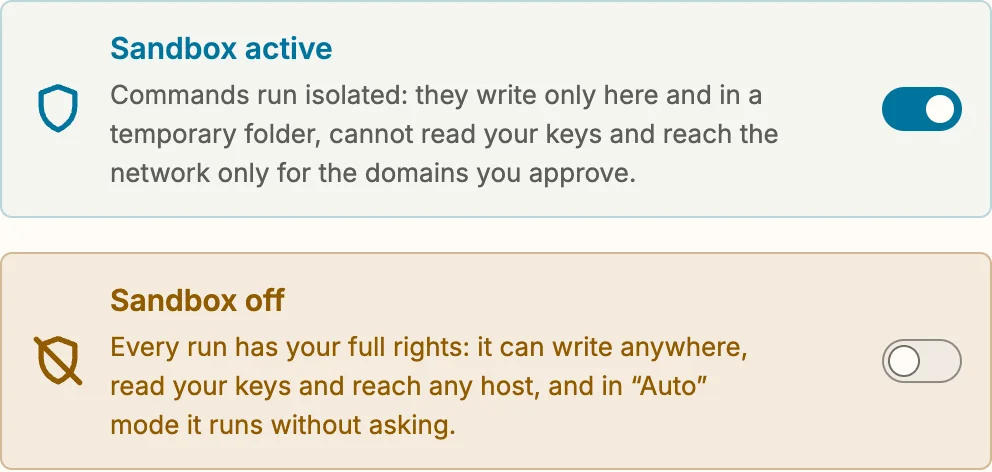
The state is the tile's title, in blue or amber, with the same shield as next to the folder name — struck through when commands are not isolated — and one sentence on what it means. Color is never the only signal: icon, title and text say it too. And if the switch is on but the system can't isolate — Linux without bubblewrap, a failed self-test — the tile says “Sandbox unavailable” and why, instead of claiming that the sandbox is active.
The second change is about what the model suggests. When a single program such as gh runs into the sandbox — no network, or no write access to its own folder — the instructions Snotra gives the model only described how to switch the sandbox off for the whole folder. So that is what the model tended to propose. It now suggests a program allowance instead: extra rights inside the sandbox for that one program, confirmed in a system dialog, while everything else stays isolated. Switching the sandbox off is still possible. It just isn't the first answer any more.
What comes next
Thirteen blocks are still open. Next up are settings and persistence, the chat history, the update path and the skills; then the interface; and last the MCP connection and the file tree, once the work currently going on there has settled. Their fixes will arrive the same way — in releases that don't add much, and are better for it. After the last block comes the architecture review, which gets to question what this one takes as given.
Getting it
Snotra checks for a newer version at startup and walks you through the update, one confirmed step at a time. If you rely on deny rules or your own sensitive patterns, this is an update worth taking. Otherwise, download it for macOS, Windows or Linux, or read the release notes on GitHub. Every finding is an issue with its reasoning and its fix, linked from the review epic; if you see something the review missed, the Discussions are open.